Sign Language Translator AI
A real-time sign language recognition system that reads hand gestures through a webcam and speaks the detected word out loud. Show a gesture, get the prediction in under a second, with full confidence scoring and live visualization.
Overview
Sign Language Translator AI is a real time sign language recognition system that uses a webcam to detect hand gestures and convert them into spoken words. By tracking 21 landmarks on each hand every frame, the system captures detailed hand movements and feeds them into a trained neural network that can recognize signs with less than a second of delay.
To make the process transparent, a custom dashboard provides a live view of the model's inputs and predictions. Users can see the tracked hand skeleton, normalized landmark data, class probabilities, confidence scores, and prediction history in real time, making it easy to understand how the system reaches each decision.
Problem it solves
Sign language is an important way for many people to communicate, but conversations can become difficult when the other person doesn't understand it. Sign Language Translator AI helps bridge that gap by translating recognized hand signs into spoken words in real time, letting people who don't know sign language understand basic signed communication without any prior training.
How it works
Webcam feed is captured and flipped live. MediaPipe detects up to 2 hands and full body pose every single frame.
21 hand landmarks per hand are extracted and normalized to wrist position and hand size, distance and placement stop mattering.
A dense neural network scores the normalized 63-value input against all gesture classes and returns a probability for each.
A 10-frame majority vote eliminates flicker. Above 85% confidence, the word is spoken aloud via the system speaker.
Features
- 15 gesture classes including yes, no, hello, help, emergency and more.
- Real-time body-relative position tracking using shoulder and nose landmarks.
- 10-frame prediction smoothing buffer to eliminate false positives.
- Text-to-speech output via pyttsx3.
- Live dashboard with hand skeleton, normalized landmarks, class probabilities, and pipeline view.
- Works with one or two hands simultaneously.
Inside the live dashboard
Three panels that show exactly what the model sees and how it decides.
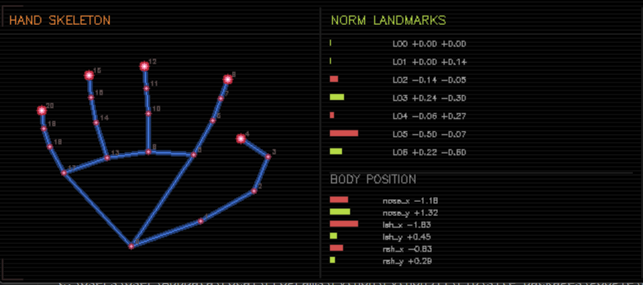
Hand Skeleton & Norm Landmarks
The left side shows a clean, isolated hand skeleton built from the first detected hand's 21 landmarks. Those points are scaled to fit the panel and then reconnected to redraw the hand, completely separate from the live camera feed.
On the right, the display shows the first 14 normalized values from hand1_norm as colored bars , cyan for positive values and red/blue for negative ones, along with six body position values calculated relative to the nose and both shoulders.
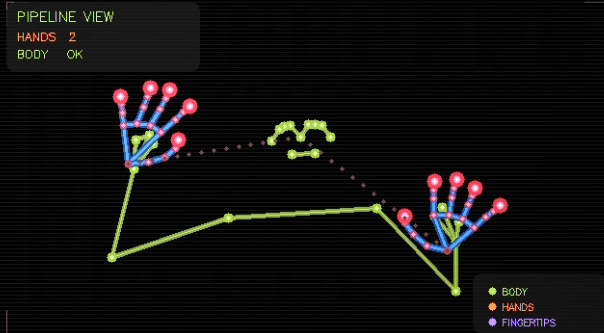
Pipeline Hand View
The pipeline view is a stripped-down visualization on a black background with subtle scanlines every few pixels, showing exactly what MediaPipe is tracking. The body pose is drawn in cyan using data from pose_result, while the hand connections appear in orange. Fingertips are emphasized with layered purple and white circles at landmarks 4, 8, 12, 16, and 20.
A dotted line is manually drawn by stepping through points between each wrist and the nose landmark, giving a clear sense of spatial alignment. In the corner, a small stats panel confirms that num_hands = 2 and that body tracking is active.
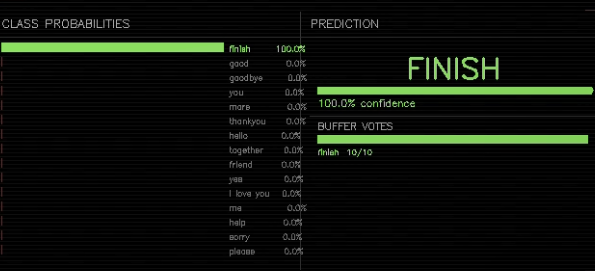
Class Probabilities & Prediction
At the top, a bar chart displays the probability for each gesture class, updated every frame from predictions_raw. Each class the model recognizes gets its own bar, and the strongest prediction is highlighted in green.
Below that, the prediction panel shows the current predicted class along with a confidence bar. Underneath, there's a voting history from prediction_buffer, which stores the last 10 frame-by-frame predictions as small bars, so you can see the decision forming over time. A word only gets confirmed once the confidence stays above 85% across that buffer.
Body & hand tracking in motion
A walkthrough of the pipeline tracking hands and body in real time, moving around, changing distance, and staying locked on.
Behind the build, challenges & learnings
Consistent landmark normalization
Hand size and distance from the camera kept skewing predictions. I normalized every landmark relative to the wrist and overall hand size, so the same gesture looks the same to the model whether the hand is close or far.
Eliminating prediction flicker
Frame-by-frame predictions jittered between similar classes. A 10-frame majority vote buffer cleaned it up without adding noticeable lag, words only get spoken once confidence stays above 85% across the buffer.
Two-hand input with stable slots
MediaPipe doesn't guarantee which hand is hand 1 vs hand 2 between frames. I added consistent slot assignment so each hand keeps its identity across the whole sequence.
Body-relative positioning
The same handshape can mean different things at chest vs head height. Pose landmarks (nose + shoulders) feed the model spatial context so it can tell those signs apart.
Tech stack
Python / TensorFlow / Dense Neural Network / MediaPipe
OpenCV / MediaPipe Hands / MediaPipe Pose
pyttsx3 / Real-time OpenCV dashboard
Trained locally on self-collected gesture data. MediaPipe handles landmark extraction, a custom dense network handles classification, and pyttsx3 handles speech output, all running in a single real-time loop at webcam framerate.
Summary
Sign Language Translator AI shows how landmark-based ML, careful normalization, and small UX decisions (a smoothing buffer, a confidence threshold, a clear dashboard) combine into a fast, accessible communication tool.